godot-tts
Offline-first system text-to-speech app for Android and Windows, built with Godot 4.7.
| 项目信息 | |
|---|---|
| 仓库 | https://github.com/Maicarons/godot-tts |
| 主要语言 | GDScript |
| Stars | 1 |
| 类型 | 原创项目 |
| 许可证 | Apache-2.0 |
| 最近更新 | 2026-07-16 |
GodotTTS
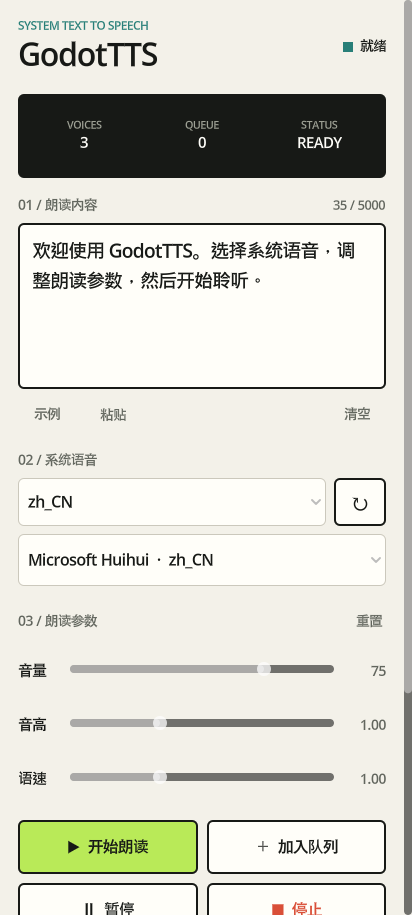
GodotTTS is a focused system text-to-speech app for Android, built with Godot 4.7. It uses Godot's native DisplayServer TTS API, so text stays on the device and no third-party plug-in, account, API key, or microphone permission is required.
Features
- Discover voices installed on the device and filter them by language
- Select a specific voice and adjust volume, pitch, and speaking rate
- Speak immediately, queue passages, pause, resume, and stop playback
- Track speech progress through native utterance callbacks
- Restore the last text, selected voice, language, and speech parameters
- Reuse or copy recent passages from local history
- Run without cloud services when the selected system voice supports offline speech
- Inspect an optional runtime log for device-specific TTS diagnostics
Requirements
- Godot 4.7 or later
- Godot export templates for Android and Windows
- JDK 17 and an Android SDK for Android exports
- An Android device or emulator with a TTS engine and at least one installed voice
Run the app
- Clone the repository.
- Open
project.godotwith Godot 4.7 or later. - Press
F6orF5for a desktop preview.
Desktop voice availability depends on the operating system. Android behavior should always be verified on a physical device or emulator.
Export for Android
- Install the matching Android export templates in Godot.
- Configure the Java SDK and Android SDK paths in Editor Settings.
- Open Project > Export, select the Android preset, and provide a release keystore for production builds.
- Export an APK or change the preset to AAB for store distribution.
The default development output is build/android/GodotTTS.apk. Signing files and credentials must never be committed.
GodotTTS does not request microphone permission. Some system voices download language data or use network services; this is controlled by the installed TTS engine rather than the app.
Export for Windows
Select the Windows Desktop preset in Project > Export, or run:
godot --headless --path . --export-release "Windows Desktop" build/windows/GodotTTS.exe
The Windows package uses a single executable with the project data embedded. Official releases provide a ZIP archive for distribution.
Test
Run the headless suite with a Godot executable available on PATH:
godot --headless --path . --script res://tests/smoke_test.gd
The suite validates project metadata, application resources, preference persistence, value limits, history sanitization, and history deduplication.
Project structure
.
|-- .github/              GitHub workflows and templates
|-- docs/                 Localized documentation and media
|-- src/
|   |-- app_store.gd      Preferences and local history
|   `-- main.gd           Interface and TTS orchestration
|-- tests/                Headless tests
|-- export_presets.cfg    Android export preset
|-- main.tscn             Main scene
`-- project.godot         Godot project configuration
Privacy
Preferences and recent passages are stored only in Godot's per-user application data directory. GodotTTS does not include analytics, advertising, remote logging, or cloud APIs. Clearing app data removes the stored preferences and history.
Contributing
See CONTRIBUTING.md for development and pull request guidance. Please report security issues according to SECURITY.md.
License
Licensed under the Apache License 2.0.