GitWino
GitWino - powerful tool for querying and analyzing Git repository history
| 项目信息 | |
|---|---|
| 仓库 | https://github.com/Maicarons/GitWino |
| 在线体验 | https://gitwino.netlify.app/ |
| 主要语言 | Go |
| Stars | 1 |
| 类型 | 原创项目 |
| 许可证 | Apache-2.0 |
| 最近更新 | 2026-03-30 |
| 主题 | commit · git · github |
GitWino
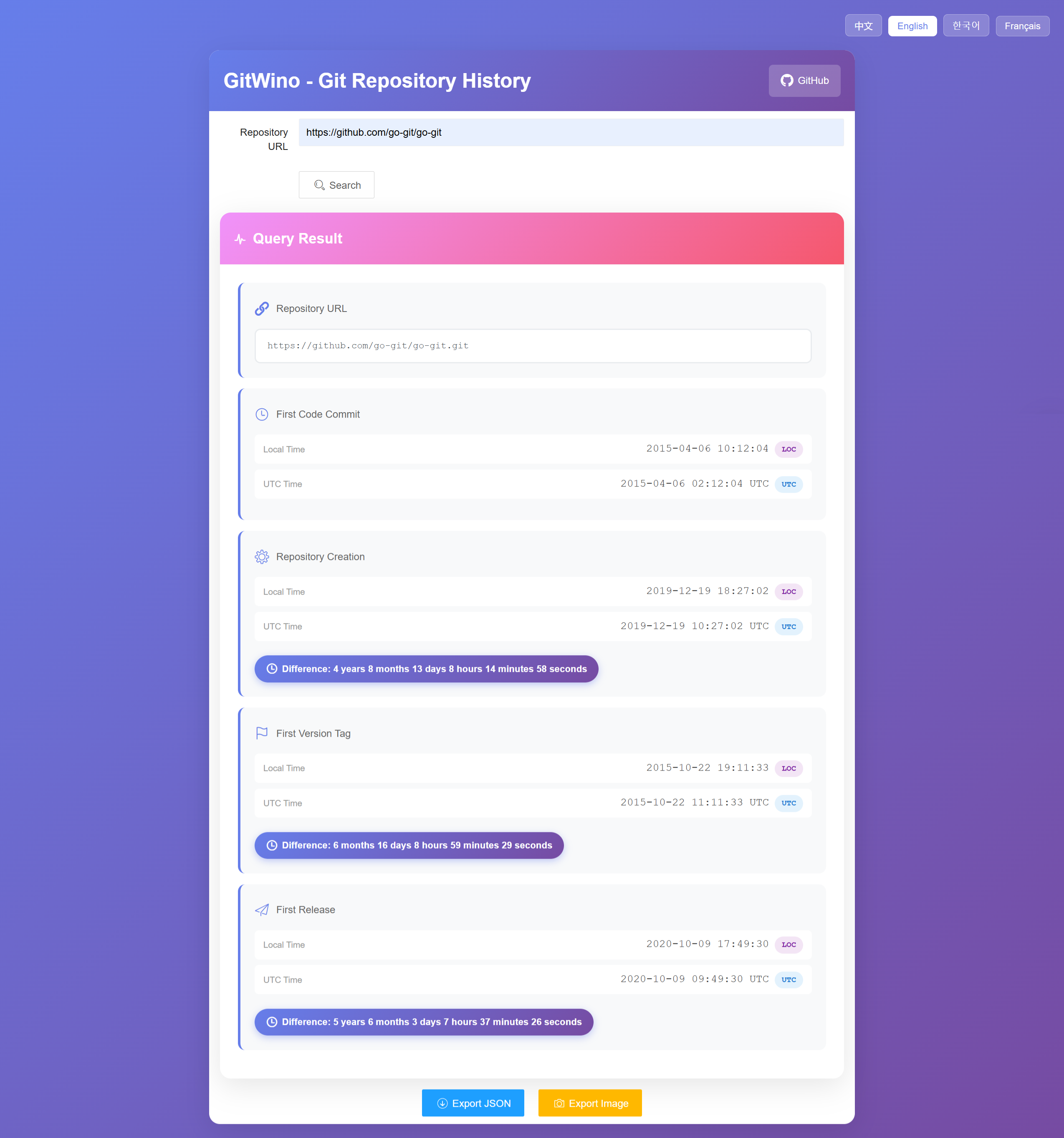
GitWino is a powerful tool for querying and analyzing Git repository history. It provides detailed timeline information about code commits, repository creation, version tags, and releases across multiple Git platforms.


Features
- Multi-Platform Support: Supports GitHub, Gitee, and GitLab
- Comprehensive Timeline: Query the following key timestamps:
- First code commit time
- Repository creation time
- First version tag time
- First release time
- Time Zone Display: Shows both UTC and local time for all timestamps
- Time Difference Analysis: Automatically calculates time differences between events
- Export Options: Export results as JSON or image
- Modern UI: Beautiful gradient interface with responsive design
- Multi-Language: Supports Chinese, English, Korean, and French
Technology Stack
Backend
- Language: Go 1.25.0
- Web Framework: Gin
- Git Library: go-git/v5
- Deployment: Vercel serverless deployment support
Frontend
- UI Framework: Layui
- Libraries: html2canvas (for image export)
- CDN: BootCDN for fast asset delivery
Installation
Local Development
-
Clone the repository
git clone https://github.com/Maicarons/GitWino.git cd gitwino -
Install dependencies
go mod download -
Run the application
go run main.go -
Access the application Open your browser and navigate to
http://localhost:8080
Deploy to Vercel
GitWino supports serverless deployment on Vercel:
-
Install Vercel CLI:
npm install -g vercel -
Deploy:
vercel
The vercel.json configuration file is already included in the project.
Usage
- Enter Repository URL: Input a Git repository URL (supports GitHub, Gitee, or GitLab)
- Example:
https://github.com/owner/repo - Example:
https://gitee.com/owner/repo -
Example:
https://gitlab.com/owner/repo -
Click Search: The system will automatically:
- Clone the repository temporarily
- Analyze commit history
- Query platform APIs for creation and release information
-
Calculate time differences between events
-
View Results: Results include:
- Repository URL
- First commit time (with UTC and local time)
- Repository creation time (with time difference from first commit)
- First tag time (with time difference from first commit)
-
First release time (with time difference from first commit)
-
Export Data:
- Click "Export JSON" to download data in JSON format
- Click "Export Image" to save results as a PNG image
API Reference
Query Repository History
Endpoint: GET /api
Parameters:
- repo (required): Git repository URL
Response Example:
{
  "earliest_commit_time": "2020-01-15T08:30:00Z",
  "repo_creation_time": "2020-01-10T12:00:00Z",
  "earliest_tag_time": "2020-02-01T10:00:00Z",
  "earliest_release_time": "2020-02-05T14:30:00Z",
  "repo_url": "https://github.com/owner/repo.git"
}
Error Response:
{
  "error": "Error message description"
}
Project Structure
gitwino/
├── api/                    # API handlers
│   └── index.go           # HTTP request handlers
├── frontend/              # Frontend static files
│   ├── index.html        # Main HTML page
│   ├── app.js            # Application logic
│   ├── style.css         # Styles
│   └── i18n.js           # Internationalization
├── internal/git/          # Git service implementation
│   ├── providers/        # Platform-specific providers
│   │   ├── github.go     # GitHub API integration
│   │   ├── gitee.go      # Gitee API integration
│   │   ├── gitlab.go     # GitLab API integration
│   │   └── provider_manager.go  # Provider management
│   ├── git.go           # Main Git logic
│   ├── repository.go    # Repository operations
│   └── types.go         # Data structures
├── main.go              # Application entry point
├── go.mod               # Go module definition
├── go.sum               # Dependency checksums
└── vercel.json          # Vercel deployment config
Supported Platforms
- GitHub: Full support for commit history, repository creation, tags, and releases
- Gitee: Support for commit history, repository creation, and releases
- GitLab: Full support for commit history, repository creation, tags, and releases
- Other Platforms: Limited support for commit history
How It Works
- URL Parsing: The system identifies the Git platform from the repository URL
- Repository Cloning: Temporarily clones the repository using go-git
- Commit Analysis: Scans all branches to find the earliest commit
- Tag Analysis: Finds the earliest tag by commit time
- API Integration: Queries platform APIs for repository creation and release times
- Data Processing: Calculates time differences and formats timestamps
- Result Display: Presents data with both UTC and local time zones
Development
Requirements
- Go 1.25.0 or higher
- Node.js (optional, for Vercel CLI)
Build
go build -o gitwino main.go
Run Tests
go test ./...
Limitations
- Private repositories require API token configuration (not yet implemented)
- Very large repositories may take longer to analyze due to cloning time
- Some platforms may have API rate limits
Future Enhancements
- Support for private repositories with authentication
- Additional Git platform support (Bitbucket, etc.)
- Historical statistics and charts
- Batch repository analysis
- API token configuration interface
Contributing
Contributions are welcome! Please feel free to submit a Pull Request.
- Fork the repository
- Create your feature branch (
git checkout -b feature/AmazingFeature) - Commit your changes (
git commit -m 'Add some AmazingFeature') - Push to the branch (
git push origin feature/AmazingFeature) - Open a Pull Request
License
This project is licensed under the Apache 2.0 License.
Acknowledgments
Contact
- Author: Maicarons
- Project Link: https://github.com/Maicarons/GitWino
Made with ❤️ by Maicarons